Configuring Neural Networks
The Neural Nets page displays a hierarchy of all neural network templates and definitions defined in the system. A neural network template encapsulates all of the non-meter-specific parameters required to allow a neural network to be trained and used for forecasting. A neural network definition is a neural network that is fully configured with enough information such that it can be successfully trained and used to forecast energy load estimates for a single meter or meter group.
From this page you can create and configure neural network templates and definitions, as well as view the statuses of neural network definitions. The default hierarchies displayed include All Definitions, All Templates, Archived Definitions, Meter/Group Definitions, Misconfigured Defs, and Pending Approval.
|
Neural Nets page |
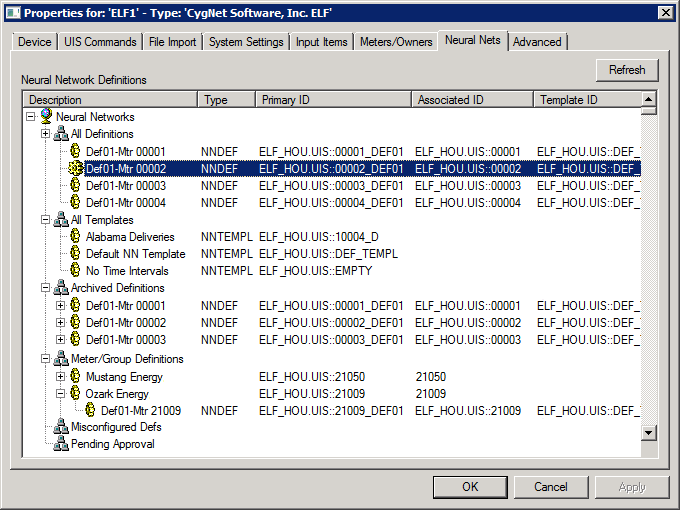
The properties for each section of this page are described below.
| Parameter | Description | ||||||||||||||||||||||
|---|---|---|---|---|---|---|---|---|---|---|---|---|---|---|---|---|---|---|---|---|---|---|---|
|
Click Refresh to refresh the hierarchy of all neural networks definitions and templates defined in the system. |
|||||||||||||||||||||||
|
Neural Network Definitions |
For each neural network definition or template defined in the system the following columns are displayed: Description, Type (Template or Definition), Primary ID, Associated (External) ID, Template ID, and Details (Effective Times/Status/Errors). Select the desired hierarchy node and right-click to reveal the following menu options:
|
||||||||||||||||||||||
|
Errors |
Click Errors to view any load errors associated with the neural network tree. |
More:
 Configuring Neural Network Template Settings
Configuring Neural Network Definition Settings
Viewing Archived Neural Network Definitions


